A blue mountain lake between green alpine hills

Add-on · included in Pro

A floating Book Now button for your WordPress site.

Add a floating Book Now button to every page. One click opens the booking form in a popup, so guests never have to hunt for your booking page.

Free core plugin0% commissionRuns on your own WordPress site14-day money-back on Pro

yourtours.com

Any page of your site: home, tour pages, blog posts.

Book now

The button follows guests as they scroll

In short

How do I add a Book Now button to every page of a WordPress site?

Install HarborBook and the Popup Widget add-on, choose the label, colour and position, and pick the pages it appears on. The button opens your booking form in a popup without leaving the page.

What it does.

On every page

Show the button site-wide or only on the pages you choose.

Open on the right activity

On a tour page, the popup can start with that tour already selected.

Matches your brand

Set the label, colour and position of the button.

Set up in three steps.

  1. Install and activate

    Upload the add-on and enter your HarborBook licence key.

  2. Style the button

    Choose the label, colour and corner of the screen.

  3. Pick where it shows

    Everywhere, or on selected pages and posts.

Settings at a glance.

SettingOptions
ButtonLabel, colour, position
DisplayWhole site or selected pages
Pre-selected activityPer page, optional
MobileFull-screen booking form

The popup uses the same booking form as the shortcode, so availability and prices always match.
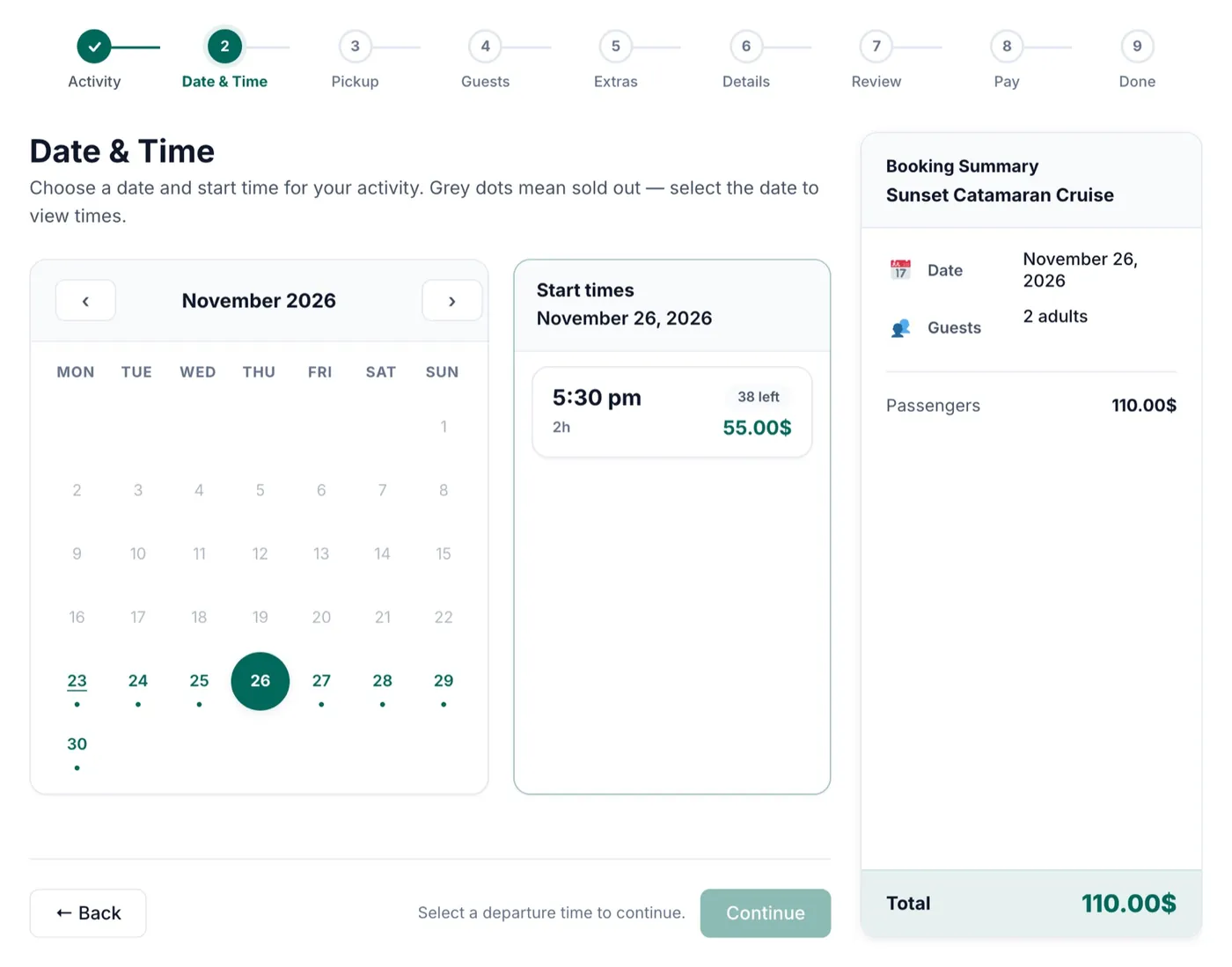
yourtours.com/book

HarborBook booking form on the date and time step

Where guests see it

The popup button, inside the same booking flow.

No separate checkout and no second plugin to style. The add-on switches on inside the form and admin you already use.

Same form, same designGuests never leave your site.

One license keyIncluded in Pro with all the other add-ons.

On in minutesActivate, set two or three options and it is live.

FAQ

Questions, answered.

Short answers to the questions operators ask most.

Does it work on mobile?

Yes. On phones the booking form opens full screen.

Can it open a specific tour?

Yes. On a tour page it can start with that tour selected.

Is availability the same as on my booking page?

Yes. The popup uses the same booking form, so seats and prices always match.

Mountain lake between green hills under a blue sky

Free core plugin · no card needed

Start taking bookings on your own site.

Install HarborBook free, add your first activity and open your calendar to guests.